
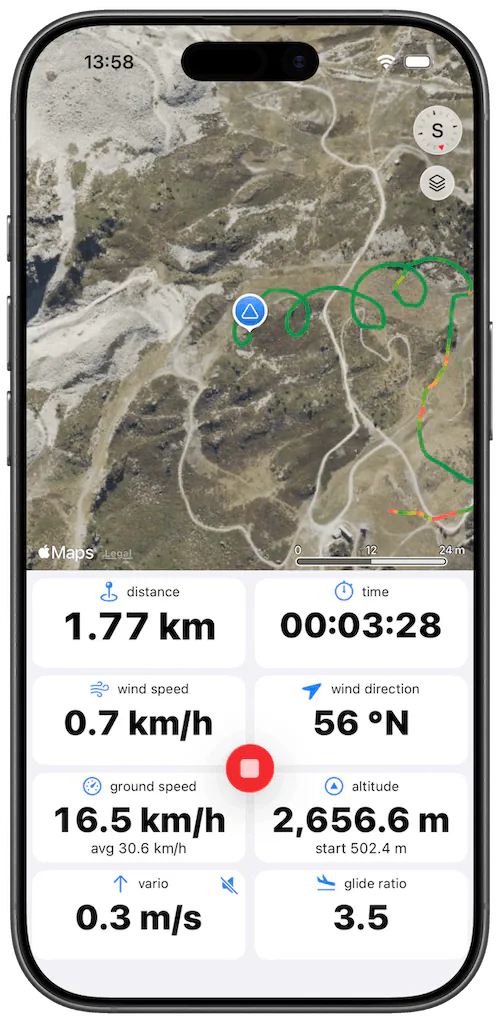
What Wingman does on a paramotor flight
- Vario. Climb and sink rate from the phone's barometer and accelerometer, with sound. Engine vibration doesn't disturb it, so you can use it under power and when you throttle back to work a thermal.
- Automatic recording. Take-off detection starts the recording during the launch run and landing detection stops it after you land, so you don't have to touch the phone with the engine running.
- Instruments. Ground speed, altitude above sea level and above take-off, glide ratio, distance, time since take-off, and the wind direction and speed, estimated from your drift.
- Airspaces. Nearby airspaces on the map, your vertical position relative to them, and an alert with sound when you get too close.
- Live tracking. Send a web link so someone on the ground can follow you, let your Wingman friends see where you are, or send your position to PureTrack.
- Logbook. Every flight with its track, 3D replay and statistics, plus your lifetime totals: flights, flight time, distance. Flights can be exported as IGC or GPX files.
- Units. Each instrument can have its own unit, so altitude can be in feet while ground speed stays in km/h.
- Bluetooth varios. If you already fly with an XCTracer, Syride or Stodeus device, Wingman can record the flight with its sensors.
Hearing the vario over the engine
With the engine running you won't hear the vario from a pocket. Mount the iPhone where you can see it, send the sound to the Bluetooth headset in your helmet, or fly with the Apple Watch, which also taps your wrist in lift.
The Watch app works without the iPhone: it records the flight with its own GPS, detects take-off and landing, and sends the flight to the iPhone after you land. More about Wingman on Apple Watch.
Set Paramotor as your aircraft type
In Preferences > Pilot and Equipment, set the type to Paramotor (PPG). Every new flight is saved with that type and with your wing's manufacturer and model. You can change them on a single flight, for example after a flight without the motor.
1st time using. Loved it. Easy to read when flying!
Ash3162, App Store review, July 2024
Awesome way to keep track of logged hours
I didn’t even know this was working in the back ground tracking flights. Awesome appjimjiminnyjimjim, App Store review, September 2023
Frequently asked questions
Does engine vibration disturb the vario?
No. Engine vibration doesn't disturb Wingman's vario, so you can use it under power and when you throttle back in a thermal.
Does take-off detection work on a paramotor?
Yes. It starts the recording during the launch run, so the whole flight is in the logbook. Landing detection stops the recording after you land.
Does Wingman work on a trike?
Yes, on a trike and with a foot launch.
Can someone on the ground follow my flight?
Yes. Send them a web link that shows your position live for 24 hours or until you land. You can also share your position with your Wingman friends or with PureTrack.
Which iPhones and Watches work?
Any iPhone that runs iOS 15.4 or later, which means the iPhone 6s or newer, and all of them have a barometer. On the Apple Watch you need watchOS 10 or later: Series 4 or newer, SE or Ultra. The App Store listing always shows the current minimum versions.