
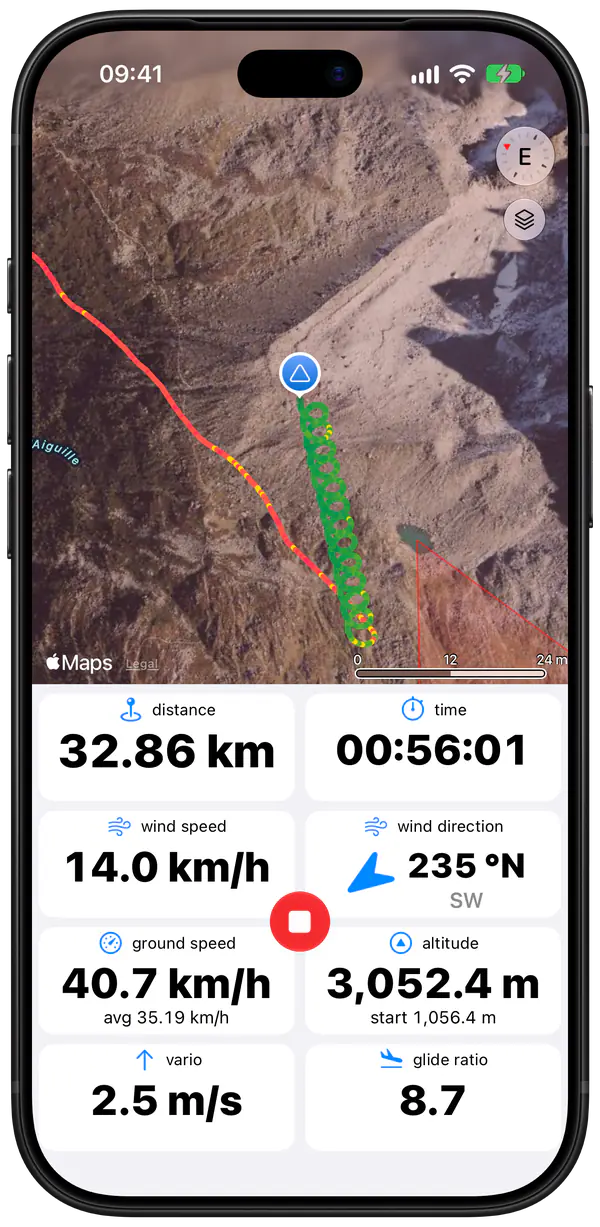
What Wingman does on a hang gliding flight
- Vario. Climb and sink rate from the phone's barometer and accelerometer, with sound, so you can work a thermal by ear with your hands on the bar.
- Automatic recording. Take-off detection starts the recording after a foot launch or during the take-off run of an aerotow, and landing detection stops it after you land.
- Instruments. Ground speed, altitude above sea level and above take-off, glide ratio, distance, time since take-off, and the wind direction and speed, estimated from your drift.
- Airspaces. Nearby airspaces on the map, your vertical position relative to them, and an alert with sound when you get too close.
- Live tracking. Send a web link so your retrieve driver can follow you, let your Wingman friends see where you are, or send your position to PureTrack.
- Logbook. Every flight with its track, 3D replay and statistics, plus your lifetime totals: flights, flight time, distance. Flights can be exported as IGC, GPX or KML files, the last for Google Earth.
- Units. Each instrument can have its own unit, so altitude can be in feet while ground speed stays in km/h.
- Bluetooth varios. If you already fly with an XCTracer, Syride or Stodeus device, Wingman can record the flight with its sensors.
Where to put the phone
Lying prone with your hands on the base bar, you look ahead and down, not at your chest. Hang glider pilots usually clamp their instruments to an upright, and a phone in a mount on the upright works the same way: the screen stays in your line of sight. At speed the wind gets loud, so many pilots also send the vario sound to a Bluetooth headset in the helmet.
The Apple Watch is already where you look, on the wrist that holds the bar, and it taps your wrist in lift. The Watch app works without the iPhone: it records the flight with its own GPS, detects take-off and landing, and sends the flight to the iPhone after you land. More about Wingman on Apple Watch.
Set Hang glider or Rigid wing as your aircraft type
In Preferences > Pilot and Equipment, set the type to Hang glider, or to Rigid wing if you fly a rigid. Every new flight is saved with that type and with your glider's manufacturer and model. You can change them on a single flight, for example after a paragliding trip.
I use this for hang gliding, since 1993 I have used the same Vario and use a 15 year old Garmin to track my flights so this App is a huge improvement. It is easy to read, has no perceived latency (ie signaling lift or sync), the map is clear, bright and easy to read in flight.
KTim was, App Store review, July 2025
I’ve been flying with wingman for over a year now and I don’t have a single complaint on it. Overall it’s my go to free flight instrument, and paired with a Bluetooth vario the flight data is incredible. […] I use Wingman while paragliding and hang gliding
Sethur Williams, App Store review, May 2026
Frequently asked questions
Does take-off detection work on an aerotow?
Yes. Recording starts once you have moved faster than walking pace, about 7 km/h over the ground, for four seconds. On an aerotow or a winch tow that happens during the take-off run, and on a foot launch a few seconds after you leave the hill. You can also start it by hand.
Can I look at my flights in Google Earth?
Yes. Export a flight as a KML file, in a single colour or coloured by ground speed or sink rate, and open it in Google Earth. IGC files go to XContest and other online contests, and GPX files open in most mapping apps.
Can my retrieve driver follow me?
Yes. Send a web link that shows your position live for 24 hours or until you land. You can also share your position with your Wingman friends or with PureTrack.
Which iPhones and Watches work?
Any iPhone that runs iOS 15.4 or later, which means the iPhone 6s or newer, and all of them have a barometer. On the Apple Watch you need watchOS 10 or later: Series 4 or newer, SE or Ultra. The App Store listing always shows the current minimum versions.